Card limits: how they work and how to change them
Limits cap how much your card can spend, so a lost card or a fraudster can't empty your accounts. You can change them yourself.
What counts towards a limit
- Daily limit: all purchases made with the card in a day.
- Monthly limit: all purchases made with the card in a month.
- Cash per month: all cash withdrawals in a month.
A payment over a limit is declined. The limit frees up again on its reset date, shown under Limits on the card screen.
How to change your limits
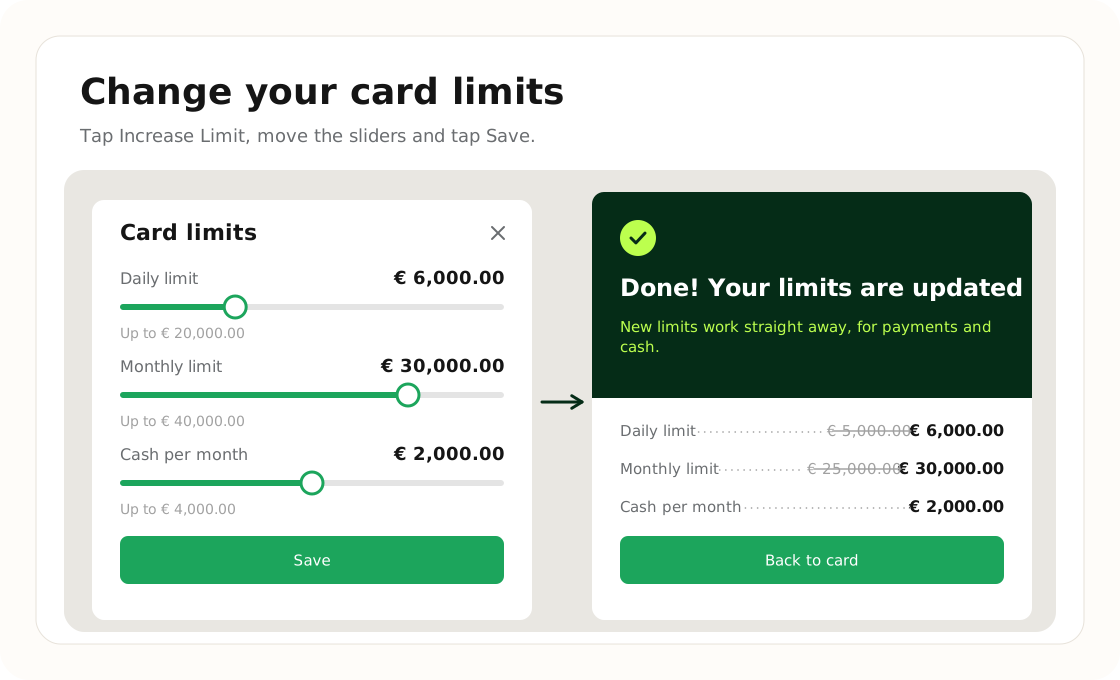
- Open Cards and tap Increase Limit under Limits.
- Move the sliders to the limits you want. Each slider goes up to the maximum for your account.
- Tap Save. The new limits work straight away.
You can lower your limits the same way at any time.
Need a higher limit?
Ask support in the chat. A limit set by Nebeus above the slider's reach is shown on the slider, marked Set by Nebeus.
Was this article helpful?
Tell us. We use it to improve the docs.