Lost your card or phone? Freeze or close the card
If you lose your phone or think someone knows your card details, freeze the card straight away.
Freeze the card
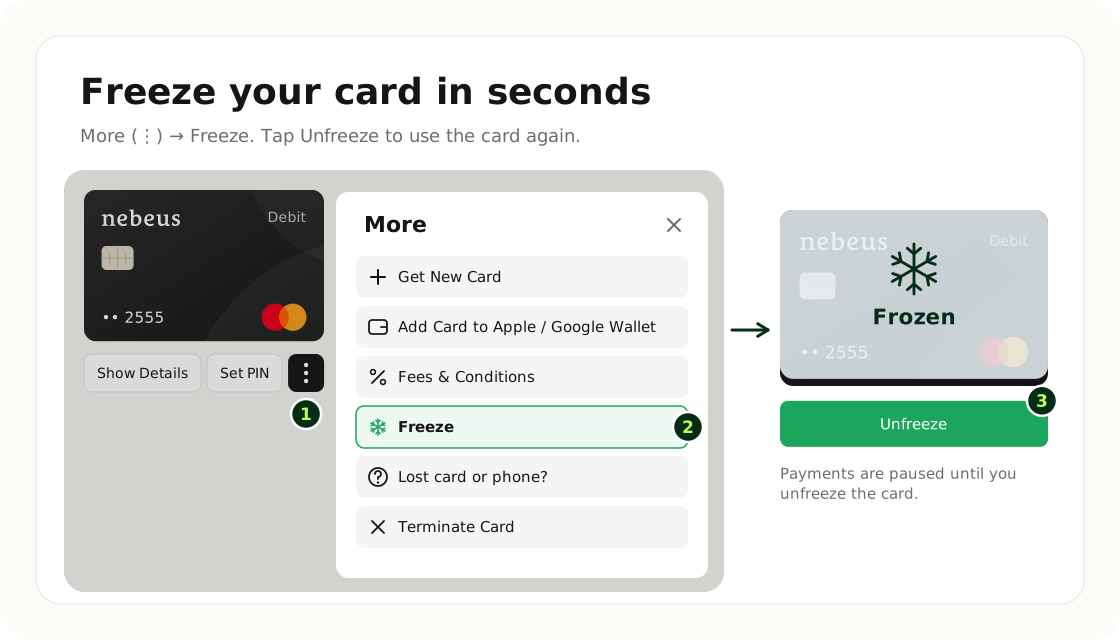
- Sign in to Nebeus on any device.
- Open Cards and tap the More button (three dots) under the card.
- Tap Freeze.
Nobody can pay with a frozen card. Unfreeze it the same way when you are ready; nothing else changes.
Close the card
If someone may have seen your card details, close the card and open a new one: More, then Terminate Card.
- The card stops working at once: payments and subscriptions on it are declined.
- A closed card can't be reopened. It stays in Cards for 30 days with its history, then it is deleted.
- Your accounts and the money in them are not affected.
Card blocked by Nebeus
If we notice suspicious activity, we may block the card to protect you. The card then shows Card blocked. Contact support in the chat and we will help.
Was this article helpful?
Tell us. We use it to improve the docs.